

The Workflow
The end-to-end cl-dev skill chain that takes a request from spec to a reviewed, merged pull request.
CodeLantern turns a request into shipped code through a chain of small, focused steps called skills. Each skill does one job, hands you a clear result, and points you to the next step, so you always know where you are and what happens next. You run them from your coding agent as slash commands, like /cl-dev:spec.
You don't have to memorize the chain. Start with /cl-dev:spec and let each skill guide you forward. Larger or riskier work uses the optional design steps; small changes can skip straight from claiming an issue to planning.
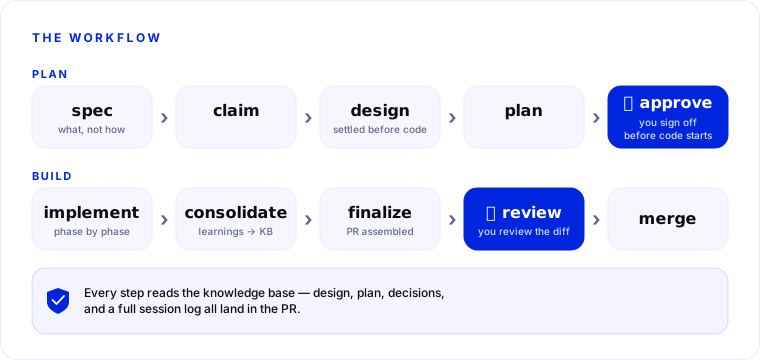
The chain
spec → claim-issue → (design-solution → review-design / reduce-complexity)
     → create-impl-plan → approve-plan → implement
     → consolidate → finalize → review-code → merge
Define the work
/cl-dev:spec: interviews you about a request and turns it into a clear issue with testable acceptance criteria, so everyone agrees on what "done" means before any code is written./cl-dev:claim-issue: sets up the work surface for an issue. It assigns the issue to you, creates the feature branch, and opens a draft pull request to track progress.
Design (optional, for larger work)
/cl-dev:design-solution: works out the approach, key decisions, and trade-offs before you commit to a detailed plan./cl-dev:review-design: gives the design a written review across structure, security, and privacy so problems surface on paper, not in production./cl-dev:reduce-complexity: pressure-tests the design for unnecessary complexity and pushes for a simpler shape where one exists.
Plan and build
/cl-dev:create-impl-plan: turns the issue into a phased, step-by-step implementation plan an agent can execute./cl-dev:approve-plan: marks the plan approved, the checkpoint that signals implementation can begin./cl-dev:implement: builds the feature phase by phase, running quality checks and updating the draft pull request as it goes.
Wrap up and ship
/cl-dev:consolidate: captures what the work taught into your project's knowledge base, so the next task starts smarter./cl-dev:finalize: writes the summary, assembles the pull request description, and marks the PR ready for review./cl-dev:review-code: reviews the final diff for correctness, security, testing, and whether it meets the acceptance criteria.- merge: once the review is satisfied, you merge the pull request through your usual source-control review process.
Session attribution
A session's cost and activity belong to the issue it set out to work on. Existing user intent and the issue selected through claim-issue or set-context establish that context; an incidental reference to another issue does not change it. Skills ask for clarification when the issue needed for the work is unclear.
- A standalone
specsession that creates issue C belongs to C, including its earlier preparation. Before C exists, the session can have repository context alone. - While working on A, you may specify a follow-up B in the same session. That work stays counted against A. Re-specifying A also keeps A.
- To claim, design, plan, implement, or otherwise begin work on B, start a new session and use
claim-issueorset-contextthere.
Repository-wide work does not need an issue. Correcting a mistaken original issue repairs the whole session's attribution; it is separate from starting work on another issue.
Run locally or hand off
Every skill runs locally and interactively. You're present in your coding agent, answering questions and steering as it works. That's the default, and the best fit when you want to stay in the loop.
When you'd rather delegate a step, use /cl-dev:handoff to pass planning or implementation to the CodeLantern cloud agent. It picks up the work item and continues on its own. The cloud agent is optional and runs on GitHub repositories. Interactive interviews and design work remain local.
How labels track progress on your board
As an issue moves through the workflow, CodeLantern attaches cl-* labels that signal its state. Each label maps to a state. With project board automation, labels also move issues on your board; that page shows which GitHub Projects column each label moves to.
| Label | Kind | Set by | State |
|---|---|---|---|
(no cl-* label) | None | None | backlog |
cl-spec-complete | Milestone | spec | spec_complete |
cl-planning | In-progress | claim-issue | planning |
cl-plan-ready | Gate | create-impl-plan | plan_ready |
cl-plan-approved | Milestone | approve-plan | plan_approved |
cl-implementing | In-progress | implement | implementing |
cl-implementation-complete | Milestone | finalize | implementation_complete |
Two layers: the knowledge base and the workflow
The workflow on this page is one layer; the knowledge base is the other. Every phase reads relevant knowledge as it runs, and the design, plan, decisions, and full session log all land in the pull request. Nothing is a black box.