

Repositories
Register repositories and choose where their issues and source code live.
Connecting a provider makes it available to your organization. A repository configuration tells CodeLantern where a particular repository's issues and source code live. Admins manage this from Repositories in the portal.
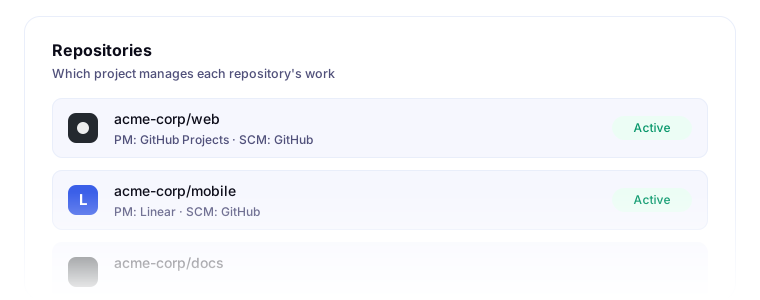
Choose providers
Project management (PM) and source control (SCM) are configured separately:
- GitHub for both: issues and code live in GitHub.
- Azure Boards and Azure Repos: issues and code live in Azure DevOps, optionally in different projects.
- Linear or Jira Cloud with GitHub or Azure Repos: planning lives in one provider and code in the other.
- Azure Boards with GitHub: work items live in Azure DevOps and code lives in GitHub.
GitHub project management requires GitHub source control. It cannot be paired with Azure Repos.
When a skill runs, it uses this configuration to find issues and open pull requests in the correct provider.
Add a repository
- Connect the required integrations.
- Open Repositories → Add Repository.
- Choose the source-control connection and repository. For Azure Repos, select its project first.
- Choose the project-management connection and its project or team, then complete any provider-specific fields shown.
- Save and check the repository's status.
Readiness and recovery
A repository needs both project-management and source-control configuration before the workflow can run. Active indicates an active configuration; each developer still needs their own provider connections and permissions.
If a repository shows Needs reconfiguration, an admin should connect the missing integration and choose Reconfigure to restore its mapping. Reconnecting an integration alone may not complete that step.
If the repository or project cannot be selected, check the provider connection and external permissions. For GitHub, also check the app's repository access. For Azure DevOps, reconnect expired authorization and verify access to the selected organization and project. Reconnecting does not grant missing provider permissions.
Once the portal configuration is ready, follow Developer Setup to initialize the local repository.